Direct Answer
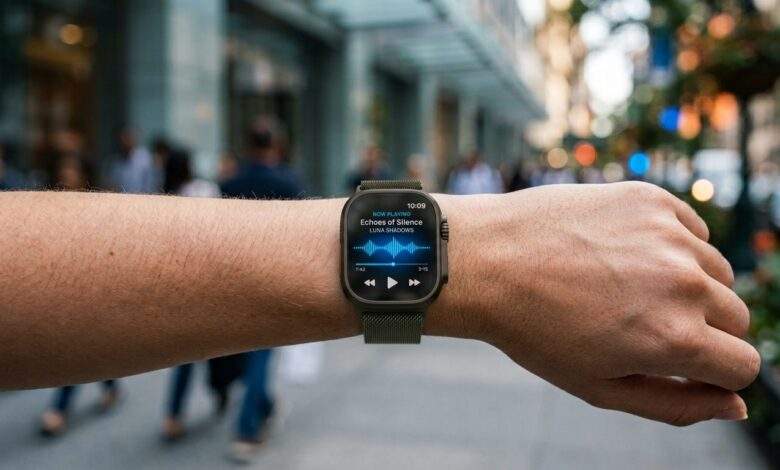
Apple Watch’s Live Rewind Audio Intelligence helps users instantly replay brief spoken moments they may have missed. By activating a fast Digital Crown gesture, the wearable presents a short text readout capturing the preceding 15 seconds, helping people stay fully engaged during meetings, daily routines, and noisy background environments.
The technical story is that Apple is packaging speech recognition as a short context tool. It is not asking users to manage audio files or long transcript archives.
The 15-Second Context Window
A narrow context window keeps the feature focused. The watch does not need to summarize a meeting; it only needs to recover a missed phrase.
That is why Live Rewind Audio Intelligence belongs in the practical-AI category. It is not flashy; it is useful at the exact second attention slips.
Key Takeaways
- Purpose-built to recover immediately preceding, unheard conversation fragments.
- Deeply integrated into the watchOS ecosystem under Apple’s Audio Intelligence umbrella.
- Triggered almost instantly using an intuitive Digital Crown double-tap gesture.
- Captures a narrow operational window spanning approximately the last 15 seconds.
- Converts recent voice inputs into an easily readable text snippet on display.
- Proves highly practical in bustling workplaces, transit hubs, classrooms, and loud social venues.
- Delivers optimal results when activated right as a gap in comprehension happens.
- Operates strictly as a quick-assist tool rather than a long-form meeting recorder.
- Requires ongoing mindfulness regarding local privacy standards and ambient recording manners.
- Serves best as a lightweight real-time conversation safety net.
How the Feature Works
The missed conversation gap
The utility directly addresses an everyday issue: a speaker delivers a key detail, the listener only catches half of it, and the discussion moves forward before a clarification can be requested.
The quick physical trigger
Double-clicking the Digital Crown minimizes UI interaction time. The wearer glances down at the generated readout and immediately reconnects with the active speaker.
The concise text delivery
Instead of generating full transcripts, the system displays a bite-sized sentence snippet, making Live Rewind fast to interpret and reliable under pressure.
How Audio Intelligence Integrates
This setup serves as a prime showcase for practical wearable AI, where sophisticated processing stays subtle and operates within familiar hardware interactions. The functionality excels by remaining unobtrusive: the watch provides immediate context and then yields back your attention.
Ideal Real-World Scenarios
Professional interactions
A brief lapse in a work meeting can cost you a crucial deadline, street address, project quote, client name, or directive. Running a quick 15-second rewind prevents minor miscommunications from escalating into workflow hurdles.
Loud public settings
Cafes, busy shops, airports, and crowded events frequently hamper clear hearing. Live Rewind offers a dependable fallback whenever an essential comment gets drowned out.
Educational settings
During lectures, workshops, or training courses, a student might miss a specific term or topic shift. Live Rewind Audio Intelligence lets them catch up on the fly without interrupting the instructor.
For people who occasionally struggle to catch every word in a conversation, having a quick way to review recent speech could also make the Apple Watch more useful as an accessibility tool.
Source: Information and compatibility details are based on Apple’s official Audio Intelligence support documentation.
What It Is Not
This capability is explicitly not designed as a background wiretap, a continuous recording log, or an automated note-taking utility. It functions exclusively as a short-window assistant for discussions you are actively involved in.
Setting these boundaries is beneficial. It keeps user expectations aligned and distinguishes everyday convenience features from heavy-duty audio logging applications.
Etiquette & Environmental Awareness
Gauge your surroundings
Microphone-dependent utilities can raise privacy concerns. Wearers should remain conscious of where they utilize the feature and observe local rules alongside general social norms.
Focus on personal assistance
The ethical application is simple: recover missed phrases within a dialogue you are actively part of. It should never be leveraged to bypass interpersonal consent.
Privacy and Social Etiquette
Know the setting
Audio-related tools can feel sensitive. Users should be thoughtful about where they use them and should understand local rules and social expectations.
Use it as assistance
The respectful use case is simple: recover words you missed in a conversation you are participating in. It should not become a workaround for consent.
Quick Use Checklist
- Identify the missed dialogue segment immediately.
- Execute the Digital Crown gesture without delay.
- Skim the brief on-screen text snippet.
- Pivot your full focus back to the ongoing conversation.
- Switch to dedicated voice recording software when a full transcript is required.
- Confirm watch hardware and watchOS version compatibility prior to relying on the tool.
Frequently Asked Questions
How far back in time can Live Rewind capture?
The feature operates within a 15-second rolling buffer, making prompt activation essential.
Does this feature store permanent sound recordings?
No. Live Rewind Audio Intelligence focuses exclusively on temporary text snippets from recent speech rather than preserving long-term audio files.
What makes Apple Watch the ideal device for this feature?
Because the watch is naturally positioned on your wrist during face-to-face interactions, tapping its crown is significantly faster and less disruptive than pulling out a smartphone.
Bottom Line
Live Rewind Audio Intelligence excels because it targets a very specific, universal frustration. When spoken words slip past you, Apple Watch provides a quick safety net to help you stay connected to the room.
Related Readings:
- What Is the Mac Studio M5 Performance Level?
- How to Master Apple Notes AI Features
- Related reading on techstormy.com: How to Move Your Data to a New iPhone 18 Safely; How To Make Your AirPods Louder.